How to Play Ultimate Tic-Tac-Toe: The 9-Board Strategy Game
Transform classic Tic-Tac-Toe into a deep tactical battle across 9 interconnected boards
Play Ultimate Tic-Tac-Toe Now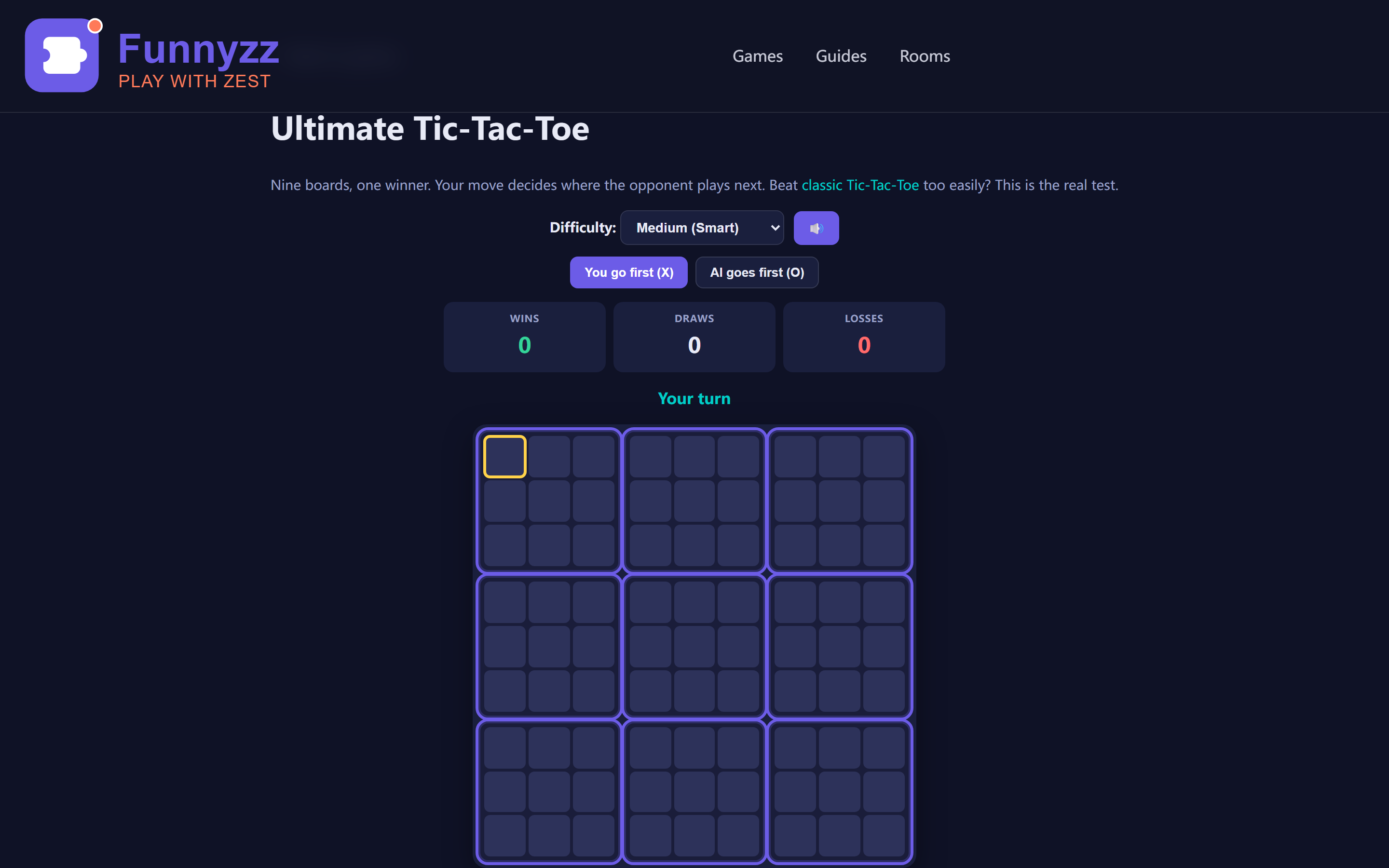
If you've ever played regular Tic-Tac-Toe and found it too simple—too predictable, too quickly over—Ultimate Tic-Tac-Toe is the answer. This variant takes the familiar 3×3 grid and multiplies it by nine, creating a game with genuine strategic depth that can challenge even experienced players.
In this guide, you'll learn the rules, understand the core strategy, and discover why Ultimate Tic-Tac-Toe has become a favorite among puzzle game enthusiasts who want more from their browser games.
Quick Answer: What Is Ultimate Tic-Tac-Toe?
Ultimate Tic-Tac-Toe is a strategic board game that layers nine small Tic-Tac-Toe boards onto one large 3×3 grid. You play on the small boards, and the first player to win three small boards in a row (horizontally, vertically, or diagonally) wins the entire game. The twist: your move on one small board determines which small board your opponent must play on next.
Unlike regular Tic-Tac-Toe (which often ends in draws), Ultimate TTT stays challenging because every move has consequences across the entire 81-cell board. Our free online Ultimate Tic-Tac-Toe game includes 3 difficulty levels (random, mixed, unbeatable AI), an undo feature (up to 5 steps), a statistics panel tracking wins/draws/losses, zoom controls for the large board, and keyboard shortcuts (WASD navigation, N/R/M, Ctrl+Z). Play as you read to practice these techniques in real time.
What Is Ultimate Tic-Tac-Toe?
Ultimate Tic-Tac-Toe (also called Super Tic-Tac-Toe or Tic-Tac-Toe²) is a nested board game. Instead of one small board, you play on nine small Tic-Tac-Toe boards arranged in a larger 3×3 grid.
The twist? Your move determines where your opponent plays next.
When you place your mark in a cell, that cell's position corresponds to one of the nine boards. Your opponent must then play in that specific board. This creates a chain of decisions where every move has consequences beyond just winning the current board.
Why It's Not Just "Tic-Tac-Toe But Bigger"
| Aspect | Regular Tic-Tac-Toe | Ultimate Tic-Tac-Toe |
|---|---|---|
| Boards | 1 | 9 (nested) |
| Moves per game | 5–9 | 50–80+ |
| Strategic depth | Minimal (solved game) | High (positional play, sacrifices) |
| Typical game length | 1–2 minutes | 10–20 minutes |
| Replayability | Low | High (every game different) |
Regular Tic-Tac-Toe is a "solved game"—with perfect play from both sides, it always ends in a draw. Ultimate Tic-Tac-Toe is far from solved. The strategic possibilities are so vast that even strong players make mistakes and lose.
Board Positions: A Quick Reference
The nine boards are numbered 1–9, reading left to right, top to bottom. Board 5 sits at the center and is the most strategically valuable position. Boards 2, 4, 6, and 8 occupy the edges and offer moderate control. Boards 1, 3, 7, and 9 are the corners and are least critical for global board control.
Opening Moves: Setting the Foundation
Your first few moves in Ultimate Tic-Tac-Toe establish the tempo and positioning for the entire game. Unlike regular Tic-Tac-Toe where you can play anywhere, your opening moves in Ultimate are constrained by the rules—but that constraint creates opportunity.
First Move: Take the Center Board
On your opening move, you can play in any of the nine boards. The strongest choice is to play in the center cell of Board 5 (the center board). This gives you immediate control of the most valuable position and forces your opponent to respond in Board 5 as well.
Why Board 5? Because it participates in four potential winning lines: the middle row, the middle column, and both diagonals. Controlling Board 5 early gives you maximum flexibility as the game develops.
Second Move: Respond to the Center
If your opponent takes the center of Board 5, they send you to Board 5. You must now play in Board 5. Your best response is to take a corner cell (positions 1, 3, 7, or 9 within Board 5). Corners in Board 5 participate in two winning lines each, giving you strong defensive and offensive potential.
Avoid playing in edge cells (positions 2, 4, 6, 8) on your second move unless you have a specific tactical reason. Edges participate in only one winning line, making them less valuable than corners.
Third Move: Establish Global Control
By your third move, you should be thinking about the global board. Ask yourself: Am I building toward a row, column, or diagonal on the global board? Or am I preventing my opponent from doing the same?
A common beginner mistake is to focus too much on winning individual local boards without considering how they connect globally. You might win Boards 1, 2, and 3 (the top row) without realizing your opponent has already won Boards 4, 5, and 6 (the middle row). The game is about global control, not local domination.
Mid-Game Tactics: Reading the Board
Once the opening phase passes, the mid-game becomes a complex dance of offense and defense. You must track nine local boards simultaneously while keeping an eye on the global board state. Here are the key tactical concepts:
Free Moves: Your Most Powerful Resource
When your opponent sends you to a board that is already won or full, you get a free move. Free moves are the most powerful resource in Ultimate Tic-Tac-Toe because they let you play anywhere on the global board.
Use free moves to:
- Take control of the center board if it is still available
- Complete a winning line on the global board
- Block your opponent from completing a winning line
- Gain positional advantage in a key board
A common mistake is to waste free moves on inconsequential boards. Every free move should advance your strategic goals or prevent your opponent from advancing theirs.
Tempo: Sacrificing Boards to Gain Advantage
Sometimes it is worth losing a local board if doing so sends your opponent somewhere unfavorable. For example, if Board 3 is about to fall to your opponent anyway, you might as well make a move in Board 3 that sends your opponent to Board 7 (a corner board with less strategic value).
This concept is called "tempo" in chess. By sacrificing a board, you force your opponent to respond to your move rather than pursuing their own agenda. Tempo gains can swing the entire game in your favor.
Double Threats: The Winning Setup
A double threat occurs when you have two ways to win on your next turn. Your opponent can only block one, so you win the other. Double threats can exist at both the local and global levels.
At the local level, you might have two cells in a row within a local board, with two empty cells completing the line. Your opponent must block both cells, which is impossible.
At the global level, you might be one board away from winning both a row and a diagonal. Your opponent must block both winning paths, which is impossible. Double threats are the most reliable way to secure victory.
The Rules: Step by Step
Setup
The game board consists of nine small Tic-Tac-Toe boards arranged in a 3×3 grid. Each small board is called a "local board." The entire structure is the "global board."
Players choose their marks: X goes first, O goes second. (You can also think of them as two different colors or symbols.)
Making a Move
- Choose a local board: On your first move, you can play in any of the nine local boards.
- Place your mark: Click an empty cell in that local board.
- Send your opponent: The position you chose determines which local board your opponent must play in next. For example, if you play in the top-right cell of a local board, your opponent must play in the top-right local board.
Winning a Local Board
When a player gets three of their marks in a row (horizontally, vertically, or diagonally) within a local board, they win that board. The board is then marked with their symbol and becomes unavailable for further play.
Winning the Game
The goal is to win three local boards in a row on the global board—just like regular Tic-Tac-Toe, but with local boards instead of cells.
What If I'm Sent to a Full or Won Board?
If your opponent sends you to a local board that is already won or completely full (a draw), you get a "free move." This means you can play in any available local board instead. Free moves are powerful tactical tools—you can use them to play in the most advantageous position.
Draws
If all nine local boards are won or drawn, and no player has three in a row on the global board, the game is a draw. However, draws are rare in practice because the nesting creates many winning opportunities.
Advanced Strategies: Mastering the Global Board
Once you understand the basics of local board control and free moves, you can start thinking about advanced strategies that separate intermediate players from experts. These concepts require practice but will dramatically improve your win rate.
Strategy 1: The Fork Attack
A fork occurs when you create two threats simultaneously. In Ultimate Tic-Tac-Toe, forks can happen at both the local and global levels. The most powerful forks are global forks where winning one local board creates threats in multiple directions on the global board.
For example, if you control Boards 1 and 5, you threaten to win the diagonal. If you also control Board 9, you've completed the diagonal and won the game. But what if your opponent blocks Board 9? You can pivot to Board 3 (completing the top row) or Board 7 (completing the left column). Multiple threats make you nearly unstoppable.
Strategy 2: Board Control Mapping
Experienced players develop a mental map of which boards control which winning lines on the global board. Here's a reference table:
| Board Position | Global Winning Lines | Strategic Value |
|---|---|---|
| Board 5 (Center) | 4 lines (row, column, 2 diagonals) | Maximum |
| Boards 2, 4, 6, 8 (Edges) | 2 lines each | High |
| Boards 1, 3, 7, 9 (Corners) | 1–2 lines each | Moderate |
This table shows why Board 5 is so valuable: it participates in four winning lines, while edge boards participate in only two. When you control Board 5, you have maximum flexibility to pursue multiple winning paths simultaneously.
Strategy 3: Reading Your Opponent's Intent
As you play, pay attention to where your opponent is trying to win. Are they building toward a row, column, or diagonal on the global board? Are they trying to control the center? Once you recognize their pattern, you can block them more effectively.
For example, if your opponent has won Boards 1 and 2, they're threatening to win Board 3 to complete the top row. You should prioritize winning Board 3 before they do. Similarly, if they control Boards 1, 5, and 9, they've already won the diagonal and the game is over.
Strategy 4: Endgame Technique
The endgame of Ultimate Tic-Tac-Toe (when 6–8 boards are decided) requires precise calculation. You must track:
- Which boards remain available
- Which boards each player needs to win
- Whether free moves can change the outcome
A common endgame mistake is to focus on winning the next local board without considering whether that board contributes to a winning line on the global board. Always ask: "Does winning this board help me complete three in a row globally?"
Strategy 5: When to Play Defensively
Sometimes the best offense is a good defense. If your opponent is close to winning the game (two boards in a row with a third available), you must prioritize blocking them over pursuing your own wins. Even if it means sacrificing a local board you were about to win, blocking your opponent's winning line is always the correct move.
Defensive play is especially important when your opponent has free moves. A free move can instantly change the game state, so you must account for it in your calculations.
Visual Guide: Winning Lines on the Global Board
Understanding which boards create winning lines on the global board is crucial for strategic play. Here's a visual breakdown of all eight possible winning lines:
Horizontal Lines (3)
Top row: Boards 1-2-3 (yellow)
Middle row: Boards 4-5-6 (green)
Bottom row: Boards 7-8-9 (red)
Vertical Lines (3)
Left column: Boards 1-4-7 (blue)
Middle column: Boards 2-5-8 (purple)
Right column: Boards 3-6-9 (orange)
Diagonal Lines (2)
Main diagonal: Boards 1-5-9 (teal)
Anti-diagonal: Boards 3-5-7 (pink)
This visual guide shows that Board 5 appears in 4 winning lines (middle row, middle column, and both diagonals), making it the most strategically important board. Boards 2, 4, 6, and 8 (edges) each appear in 2 winning lines. Boards 1, 3, 7, and 9 (corners) also appear in 2 winning lines each, but they're less central to overall board control.
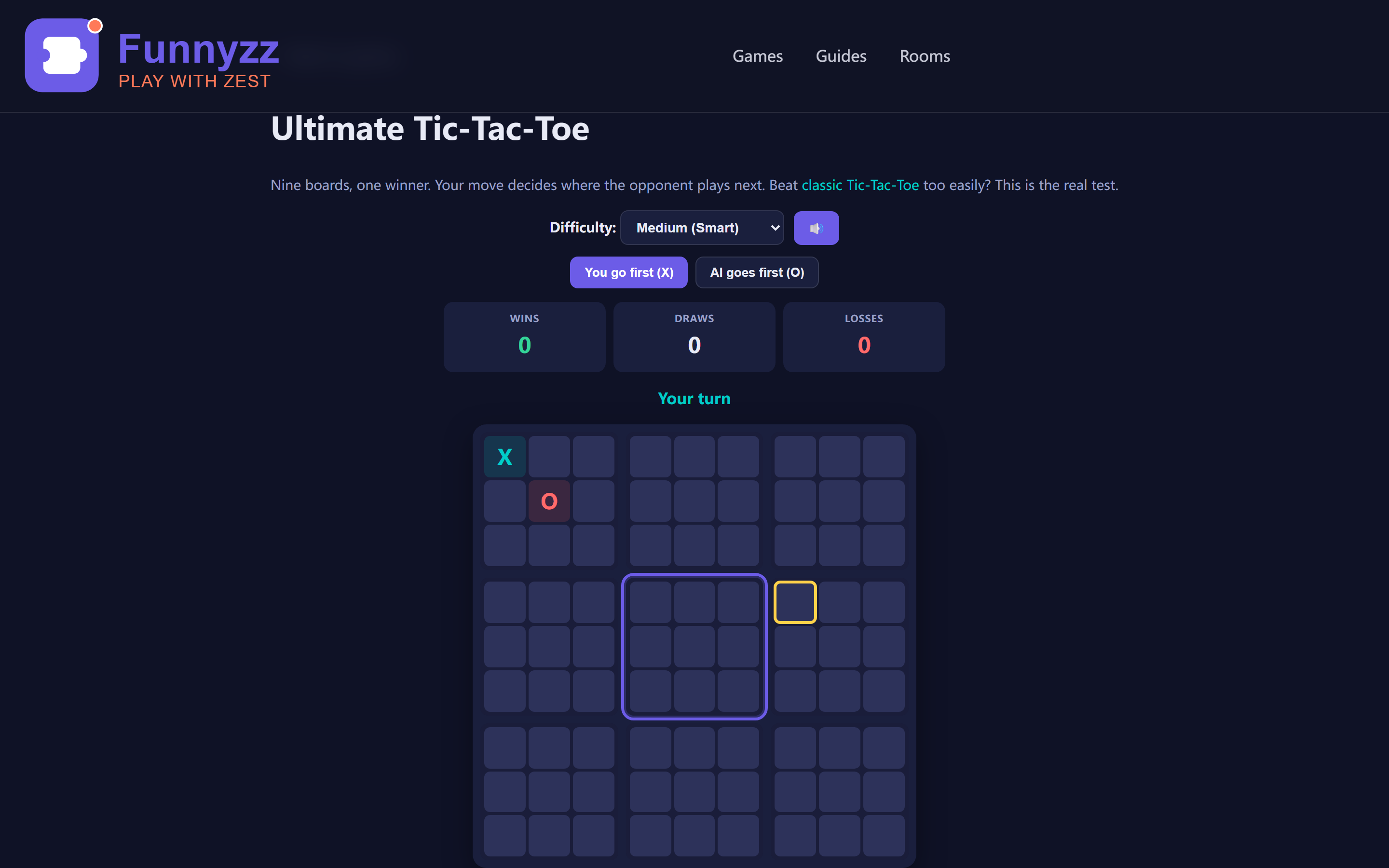
Ultimate Tic-Tac-Toe is a game of positional play. Unlike regular Tic-Tac-Toe where you just look for three-in-a-row, here you must think about where your moves send your opponent—and how that affects the larger game. The principles above (center control, free move management, double threats, tempo, and board state tracking) work together to form a cohesive strategic framework.
Common Mistakes Beginners Make
Mistake 1: Playing Only in One Board
Beginners often focus on winning a single local board and ignore the global implications. They don't realize that winning one board might send their opponent to a position where they can win the game.
Fix: Always ask, "Where does this move send my opponent?" before playing.
Mistake 2: Ignoring the Global Board
Some players focus so much on local battles that they miss winning opportunities on the global board. They might have two local boards in a row and not realize they can win the game by winning a third.
Fix: Periodically step back and look at the global board. Are you close to three-in-a-row? Is your opponent?
Mistake 3: Wasting Free Moves
When you get a free move (because your opponent sent you to a won/full board), beginners often play it in whatever board is convenient rather than the most strategically valuable.
Fix: Use free moves to play in the center board, or to complete a winning line on the global board.
Mistake 4: Not Planning Ahead
Ultimate Tic-Tac-Toe punishes players who only think one move ahead. If you don't consider where your move sends your opponent, they might set up a trap that wins them the game.
Fix: Before making a move, think about what your opponent's likely responses are and where those responses would send you.
Tips for Beating the AI
Our Ultimate Tic-Tac-Toe game has three AI difficulty levels. Here's how to approach each:
Easy Mode
The AI plays randomly. You can win by simply avoiding obvious mistakes and looking for three-in-a-row opportunities on both local and global boards.
Medium Mode
The AI uses a heuristic: it blocks your wins, takes centers when available, and avoids sending you to free moves. To win, you need to set up double threats and think two moves ahead.
Hard Mode
The AI uses look-ahead search to plan multiple moves ahead. It's a genuine challenge. To win consistently:
- Control the center board early
- Avoid sending the AI to free moves
- Look for sacrifices that gain tempo
- Track the board state carefully
Even experienced players lose to Hard mode occasionally. Don't be discouraged—it's a mark of a good challenge.
Why Ultimate Tic-Tac-Toe Is Great for Brain Training
Ultimate Tic-Tac-Toe exercises several cognitive skills:
- Working memory: You must track the state of nine boards simultaneously
- Strategic planning: Every move has long-term consequences
- Pattern recognition: You learn to spot winning opportunities and traps
- Decision-making under constraints: You can only play where you're sent (unless you get a free move)
Research on puzzle games and cognitive benefits suggests that games with strategic depth like Ultimate Tic-Tac-Toe can help maintain mental sharpness, especially when played regularly. For more brain-training options, explore our complete guide to brain training games or learn how to improve concentration with games.
🛡️ Tab Close Protection: Your Progress Is Safe
Accidentally closed the tab? No worries — our Ultimate Tic-Tac-Toe game includes automatic tab-close protection that warns you before navigating away during an active game. When you try to close the tab, refresh the page, or click a link that takes you away while you are winning three boards in a row on the 81-cell grid, your browser displays a confirmation dialog asking if you are sure you want to leave. This prevents accidental loss of your game progress, which is especially important for harder puzzles that take significant time to solve.
The protection activates only when a game is actively in progress (the timer is running). Once you complete or abandon a puzzle, the warning disappears so you can navigate freely. This feature works across all modern browsers including Chrome, Firefox, Safari, and Edge. For more tips on protecting your gameplay sessions, check out our strategy guide.
Explore More Puzzle Games
If you enjoy Ultimate Tic-Tac-Toe, you might also like:
- Classic Tic-Tac-Toe — The original game, perfect for quick matches
- Connect Four — Another game of strategic depth with simple rules
- Memory Match — Train your recall with this classic card-matching game
- Sudoku — The ultimate number-placement puzzle
- Tic-Tac-Toe Strategy Guide — Learn to win the classic version
Game Features: Statistics & Visual Feedback
Our Ultimate Tic-Tac-Toe implementation includes a comprehensive statistics panel that tracks your performance across sessions. The panel displays six key metrics: Games Played, Wins, Draws, Losses, Win Rate (percentage), and Average Time per game. Because the data persists in localStorage, you can watch your win totals climb and your average time improve over weeks of practice — a concrete measure of your strategic growth. For more on how tracking progress boosts learning, see our guide on improving concentration with games.
Ultimate Tic-Tac-Toe is part of our broader strategy game collection. If you enjoy the tactical depth of UTTT, you might also want to explore classic Tic-Tac-Toe strategy for foundational concepts, or challenge yourself with Connect Four tactics which shares similar thinking patterns about controlling the board. For a comprehensive overview of strategy games available on our platform, check out our advanced puzzle strategies guide.
The game features a mute button (🔊/🔇) in the top-right corner, allowing you to toggle sound effects on and off without leaving the game. Perfect for playing in shared spaces or focusing on strategy without audio distractions.
For desktop players, the game supports WASD keyboard navigation and global shortcuts to streamline your workflow. Use W/A/S/D keys (or arrow keys) to move the focus cursor up/left/down/right across the 81-cell board — this gives you precise control without reaching for the mouse. Press Enter or Space to place your mark on the focused cell. Global shortcuts work even after a game ends: press N to start a new game, R to restart the current game, or M to mute/unmute audio. These shortcuts let you chain practice rounds without interruption.
When you win, a celebratory confetti animation fires across the board — a small but satisfying reward that makes each hard-earned victory feel even better. The game supports both click and touch input, making it equally playable on desktop and mobile devices.
📱 Mobile Touch Controls with Haptic Feedback
On mobile devices, the game features optimized touch controls: tap any of the 81 cells to place your mark. The game provides haptic feedback (vibration) on supported devices, giving you tactile confirmation that your tap registered successfully. This is particularly useful during fast-paced play when you're making rapid decisions across multiple small boards. The touch system also prevents accidental page scrolling with touch-action: none, ensuring every tap goes to the game rather than scrolling the page. For gesture reminders, press the ? button to see "Tap cell" in the help overlay. The touch controls maintain full parity with desktop keyboard controls — every move you can make with WASD + Enter can also be made with taps.
↩ Undo: Correct Mistakes Without Restarting
Made a move you regret? Our Ultimate Tic-Tac-Toe includes an Undo feature that lets you take back your last move without restarting the entire game. Click the ↩ Undo button in the game controls, or press Ctrl+Z (Cmd+Z on Mac) as a keyboard shortcut. The game maintains an undo history stack of up to 5 moves, so you can step back through multiple mistakes if needed.
The Undo feature is especially valuable when learning strategy — you can experiment with aggressive moves, see how the AI responds, and then undo to try a different approach. This "what-if" exploration accelerates your understanding of positional play and fork setups. For beginners, think of Undo as a safety net that lets you practice without fear of permanent mistakes. The undo counter resets when you start a new game, giving you a fresh slate each time.
💡 Undo Strategy Tip
Use Undo not just to fix mistakes, but to test hypotheses. Before committing to a move that sends your opponent to a critical board, undo and explore what happens if you play elsewhere instead. This iterative approach builds pattern recognition faster than playing conservatively.
Track Your Progress: Leaderboard System
Our Ultimate Tic-Tac-Toe includes a leaderboard system that tracks your top 10 scores locally in your browser. After winning a game, you'll see a "Save Score" button (🏆) that records your victory time. The leaderboard displays your best performances with medal icons — 🥇 for fastest time, 🥈 for second, and 🥉 for third — giving you a visual target to beat.
You can filter leaderboard entries by difficulty (All / Easy / Medium / Hard) using the dropdown menu, so you can track your fastest times separately for each skill level. The Reset button lets you clear the leaderboard and start fresh whenever you want. This local tracking system is perfect for challenging friends to see who can achieve the fastest victory at each difficulty tier. For more on how competitive tracking enhances puzzle engagement, see our guide to puzzle games for parties and group activities.
🔍 Zoom Controls: Adjust Board Size for Your Screen
Ultimate Tic-Tac-Toe's 9-board layout can feel cramped on smaller screens. That's why the game includes a zoom slider (🔍 icon) that lets you scale the board from 50% to 200%. Drag the slider left to shrink the board for an overview, or right to enlarge it for better visibility on mobile devices. Your zoom preference is automatically saved in your browser, so it'll be there the next time you play.
Recommended zoom settings:
- Mobile phones: 120-150% — enlarges the board so you can see all 9 mini-grids without squinting
- Tablets: 100-120% — a comfortable middle ground that balances overview and detail
- Desktop monitors: 80-100% — the full 3x3 meta-grid fits nicely on most screens at default zoom
The zoom control uses smooth scaling, so you can adjust it mid-game without any lag or visual glitches. For deeper strategic insights, check out our Ultimate Tic-Tac-Toe strategy guide.
<h2>🔒 Smart Pause: Game Automatically Pauses When You Switch Tabs</h2>
<p>Modern browsers support the <strong>Page Visibility API</strong>, which allows our games to detect when you switch to another tab or minimize the window. All Ultimate Tic-Tac-Toe games on funnyzz.com take advantage of this feature: <strong>when you switch tabs, the game automatically pauses</strong>.</p>
<p>This means you can safely answer a message, check another page, or multitask without worrying about losing progress or making an accidental move. When you return to the tab, simply click or press any key to resume where you left off.</p>
<p><strong>Why this matters for planning across multiple boards:</strong> Unlike fast-paced action games that punish tab-switching, our puzzle games are designed to respect your attention. Auto-pause ensures that your carefully planned moves in Ultimate Tic-Tac-Toe are never ruined by a distraction in another tab.</p>
<ul>
  <li><strong>Safe multitasking:</strong> Switch tabs freely — your game stays frozen exactly as you left it</li>
  <li><strong>No timer cheating:</strong> The game timer also pauses, so your statistics remain accurate</li>
  <li><strong>Battery friendly:</strong> Paused games use zero CPU, saving laptop battery life</li>
</ul>
Keyboard Help Overlay
Not sure what keys do what? Press the ? key (or /) during gameplay to open our Keyboard Help Overlay - a visual guide that shows all available shortcuts for Ultimate Tic-Tac-Toe. You will also find a ? button in the top-right corner of the game area. The overlay lists every keyboard shortcut specific to Ultimate Tic-Tac-Toe, including W/A/S/D or Arrow keys to navigate the 81-cell board, Enter or Space to place mark, N for new game, R to restart, M to mute, Ctrl+Z to undo. Press Esc or click outside the overlay to close it. This feature works on desktop browsers and is especially helpful for discovering shortcuts you might not know about.
💾 Auto-Save & Resume: Pick Up Exactly Where You Left Off
Ultimate Tic-Tac-Toe now includes a full auto-save system that preserves your entire game state to localStorage after every player or AI move. This means if you close the browser, switch devices, or get interrupted, your game is safely saved and ready when you return.
What gets saved: The complete game state — including all 9 small boards, the big board status, current player, active board, time elapsed, moves made, difficulty level, and undo history. Everything needed to reconstruct your exact game is persisted locally.
Resume overlay: When you return to the game, you'll see a resume prompt overlay showing your saved stats: current difficulty, cells filled, boards won, active board, elapsed time, and how long ago you saved. You can choose to Resume and continue the game, or start fresh with New Game.
7-day expiration: Saved games automatically expire after 7 days. This prevents stale saves from accumulating while still giving you plenty of time to return to an in-progress game. The expiration is handled automatically — no manual cleanup needed.
Auto-clear on game end: When a game concludes (win, loss, or draw), the saved state is automatically cleared. This ensures you always start fresh for the next match. The save only persists during active gameplay.
Frequently Asked Questions
What makes Ultimate Tic-Tac-Toe different from regular Tic-Tac-Toe?
Ultimate Tic-Tac-Toe has nine small boards arranged in a 3x3 grid. When you play a cell, it determines which board your opponent must play in next. This creates deep strategy because every move affects where the battle goes next.
How do you win Ultimate Tic-Tac-Toe?
Win three small boards in a row (horizontally, vertically, or diagonally) to win the game. Each small board is won by getting three of your marks in that board.
What happens if I'm sent to an already-won board?
If your opponent sends you to a board that's already won or full, you get a "free move" and can play in any open board. This is a major tactical advantage.
Is Ultimate Tic-Tac-Toe harder than regular Tic-Tac-Toe?
Yes, significantly harder. Regular Tic-Tac-Toe is solved (always a draw with perfect play). Ultimate Tic-Tac-Toe has strategic depth comparable to chess, with positional play, sacrifices, and long-term planning.
Can I play Ultimate Tic-Tac-Toe on mobile?
Yes, the game is fully responsive and works on phones, tablets, and desktops. Touch controls let you tap the board you want to play in.
What are the AI difficulty levels?
Three levels: Easy (random moves), Medium (smart heuristic that blocks wins and takes centers), and Hard (look-ahead search that plans multiple moves ahead). Hard mode is a genuine challenge.
Can I resume my Ultimate Tic-Tac-Toe game after closing the browser?
Yes. Our auto-save system automatically saves your entire game state to localStorage after every player or AI move — including all 9 small boards, the big board status, current player, active board, elapsed time, moves, difficulty, and full undo history. When you return, a resume overlay shows your saved stats (difficulty, cells filled, boards won, active board, elapsed time, time ago). You can Resume to continue or start a New Game. Saved games expire after 7 days and are auto-cleared on game end (win/loss/draw). This feature works across all devices — desktop, mobile, and tablet.